
Today I have a treat for you guys! Heidi of Sew Heidi has put together a fabulous guest post about how Adobe Illustrator, one of my FAVORITE programs (and the cornerstone of Pattern Workshop), is used in the fashion design industry. Heidi is a partner in a small fashion design company and was able to quit her full-time employment to independently pursue her passion in design (and triple her income in the process!). You can read more about her story here. She also has great video tutorials on her site as well as a super-informative blog. I hope you'll check her out and leave her a comment or two! xoxo I began sewing in high school when my mom taught me the very basics on her vintage Husqvarna Viking - you know the one, that 50lb steel beast that will sew anything. She let me take it away to college and it's been with me ever since. And boy do I love that machine! It’s withstood my brutal abuse and has made it through many things I knew I shouldn’t subject it to but kept doing over and over again (like way too many layers of thick denim and leather...I'm sorry mom!). It has proven its determination many times over as The Little Machine That Could.
While in college at The University of Denver (yes, Lauren and I have discovered that we went to the same school at the same time - although we didn't meet until recently!) I continued to sew, but my main focus was on my degree in graphic design. I learned a lot about using Adobe Illustrator to design marketing collateral (think logos / brochures / websites), but never really thought about how it could cross over into sewing or fashion design - which in my early college days were merely a hobby. It wasn’t until I landed a job as a fashion designer that I realized how much Illustrator is used in the fashion industry as an essential tool.
Once on the job, I learned first hand how to use the AI features I was already savvy with to do brand new tasks. It was eye opening to see how the software was used in such a unique way for fashion design. Illustrator does a lot of things really well, but in my current day to day work as a fashion designer, much of my time is spent drawing fashion flats, creating repeating patterns and colorways, and laying out line sheets.
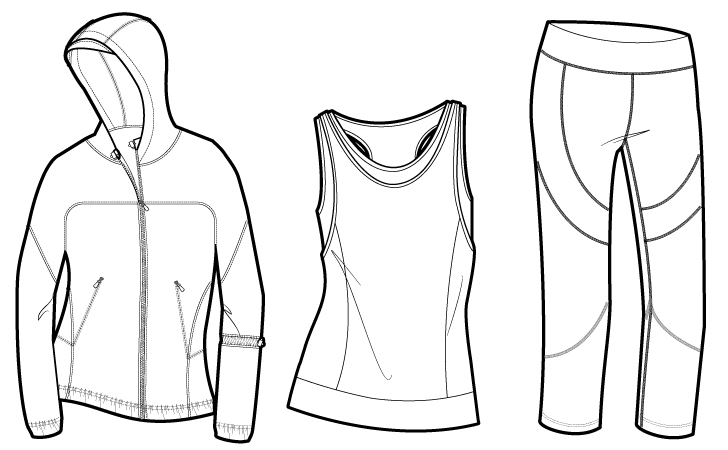
Fashion Flats
These flat sketches are created to accurately represent the garment including all seam lines, stitch details and custom trims. They're typically drawn in black and white and later filled with color to show what the finished garment will look like. The Pen Tool and I became fast friends when I first started working in the industry and to this day it's still one of the AI tools I spend a lot of time with.
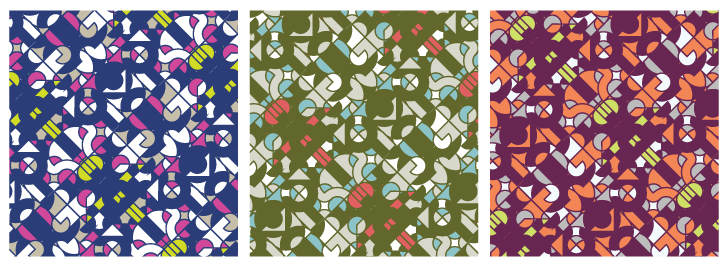
Repeating Patterns & Colorways
One of Illustrator’s most powerful features is the ability to create seamless repeating patterns. Some designers who don't use many prints or who have a separate team of artists that works on textiles may never use this feature, but due to the nature of my work, I am required to wear many hats. I love being able to create textile patterns and to see my designs all the way through from concept to completion - it allows me to thoroughly execute my vision throughout the entire garment.
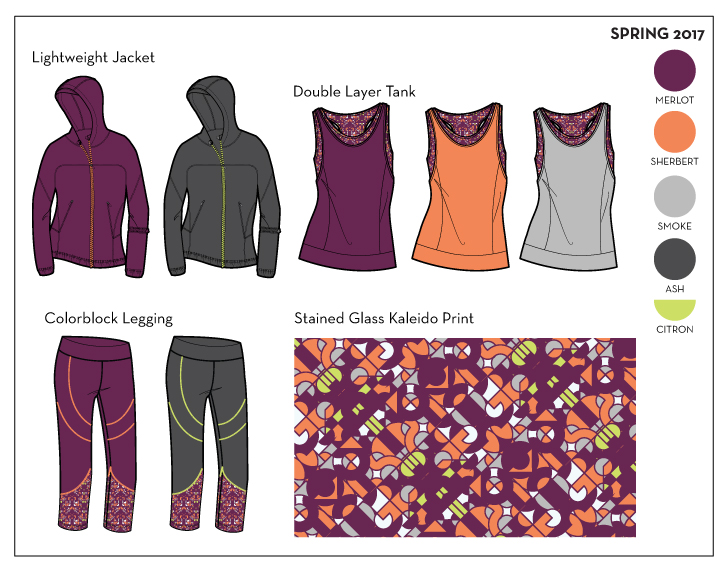
Layouts & Line Sheets
Once the collection is designed, it’s presented to the sales team and buyers in the form of a line sheet or presentation board. This is one of the most gratifying parts of the process*, when everything you've worked so hard on creating comes together to form a unified and cohesive collection.
*I just had to add an extra note here to mention the most gratifying part of the process - receiving finished garments from the factory! All of the work I design is produced overseas, so it's typically 6-8 months or more from the day I start designing to the day I actually see the garments in their completely finished states. Even after many years in the industry, getting those packages in the mail still makes me feel like a kid on Christmas morning. I'll never forget the very first time I saw a garment I had designed in real life - it was a zip up vest with a tiny vine pattern embroidered throughout. I had spent months seeing it only on a computer screen and paper, and holding the finished piece - fabric, trims and all - was the moment I realized I had actually made it as a fashion designer.
How Many Fashion Designers Don’t Use Illustrator (but many sewers do)
Since you're here on Baste + Gather, there’s a good chance you’re using AI to draft and grade your patterns. If you’ve taken Lauren’s Pattern Workshop then you are absolutely familiar with how to do this! While many sewers focus on using Illustrator for this, it’s not something you see as often in the commercial fashion design world. If designers are drafting and grading their own patterns, they’ll typically use industry software specifically for this, such as Gerber’s Accumark Pattern Design Software. However, it's also very common (especially after essential pattern blocks are created) that drafting and grading for each style is done at the factory level using a chart of POMs (Points of Measure) that the designer provides.
Where the Worlds of Fashion Design And Sewing Collide in Illustrator
Did the black and white fashion flat sketches above look familiar to you? You’ve probably noticed that most commercial patterns include black and white sketches very similar to these on the envelopes. If you are on the path to selling your patterns (or have already started), you’d most likely want to create flat sketches of your designs to show in addition to the photos. The process you would go through to create these flats would be same that we use in the fashion world, and you’ll want to get yourself up to speed on the Pen Tool (if you’ve fought with this tool like many designers have, that’s probably not what you wanted to hear - but I promise that once you master it, everything else will become so much easier!).
How Will You Use Illustrator?
You may not be drafting patterns to sell and instead your focus is on sewing personal projects. For many years, I sewed and sold my designs at boutiques throughout the US, but I never actually sold a sewing pattern. So instead of using AI for drafting and grading, I used it to mock up my designs before cutting and sewing. I found it tremendously helpful to visualize my design before I cut into the fabric only to later decide I didn't like the design (yikes!). Many designers sketch by hand, but since that was never my strength, I found it easier and quicker to design and make edits in Illustrator.
How will you incorporate some of these Illustrator features into your design and sewing process? Or if you’re already using the software in new ways, share some of the creative things you’re working on!
Thanks so much for the great post, Heidi!


