• Pattern Workshop
  • Shop
  • My Handmades
  • Jeans Sew-Along
  • About
  • Contact
Menu

Baste + Gather

  • Pattern Workshop
  • Shop
  • My Handmades
  • Jeans Sew-Along
  • About
  • Contact
Where-the-Worlds-of-Fashion-Design-And-Sewing-Collide-in-Illustrator-sew-heidi.jpg

Guest Post: Where the Worlds of Fashion Design And Sewing Collide in Illustrator

November 2, 2015

Today I have a treat for you guys! Heidi of Sew Heidi has put together a fabulous guest post about how Adobe Illustrator, one of my FAVORITE programs (and the cornerstone of Pattern Workshop), is used in the fashion design industry. Heidi is a partner in a small fashion design company and was able to quit her full-time employment to independently pursue her passion in design (and triple her income in the process!). You can read more about her story here. She also has great video tutorials on her site as well as a super-informative blog. I hope you'll check her out and leave her a comment or two! xoxo I began sewing in high school when my mom taught me the very basics on her vintage Husqvarna Viking - you know the one, that 50lb steel beast that will sew anything. She let me take it away to college and it's been with me ever since. And boy do I love that machine! It’s withstood my brutal abuse and has made it through many things I knew I shouldn’t subject it to but kept doing over and over again (like way too many layers of thick denim and leather...I'm sorry mom!). It has proven its determination many times over as The Little Machine That Could.

While in college at The University of Denver (yes, Lauren and I have discovered that we went to the same school at the same time - although we didn't meet until recently!) I continued to sew, but my main focus was on my degree in graphic design. I learned a lot about using Adobe Illustrator to design marketing collateral (think logos / brochures / websites), but never really thought about how it could cross over into sewing or fashion design - which in my early college days were merely a hobby. It wasn’t until I landed a job as a fashion designer that I realized how much Illustrator is used in the fashion industry as an essential tool.

Once on the job, I learned first hand how to use the AI features I was already savvy with to do brand new tasks. It was eye opening to see how the software was used in such a unique way for fashion design. Illustrator does a lot of things really well, but in my current day to day work as a fashion designer, much of my time is spent drawing fashion flats, creating repeating patterns and colorways, and laying out line sheets.

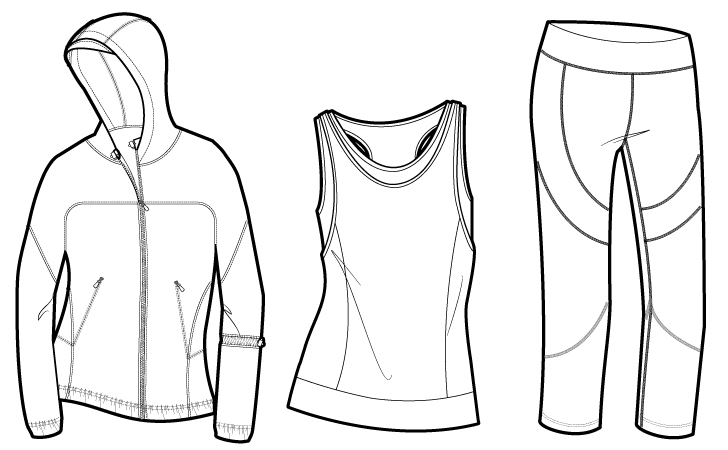
Fashion Flats

These flat sketches are created to accurately represent the garment including all seam lines, stitch details and custom trims. They're typically drawn in black and white and later filled with color to show what the finished garment will look like. The Pen Tool and I became fast friends when I first started working in the industry and to this day it's still one of the AI tools I spend a lot of time with. Baste & Gather meets {Sew Heidi}: How Fashion Designers Use Illustrator to Draw Fashion Flats
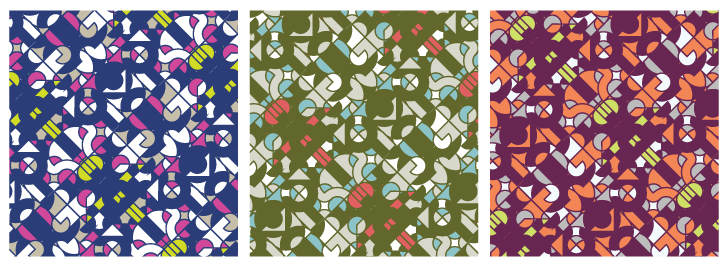
Repeating Patterns & Colorways

One of Illustrator’s most powerful features is the ability to create seamless repeating patterns. Some designers who don't use many prints or who have a separate team of artists that works on textiles may never use this feature, but due to the nature of my work, I am required to wear many hats. I love being able to create textile patterns and to see my designs all the way through from concept to completion - it allows me to thoroughly execute my vision throughout the entire garment. Baste & Gather meets {Sew Heidi}: How Fashion Designers Use Illustrator for Repeating Patterns & Colorways
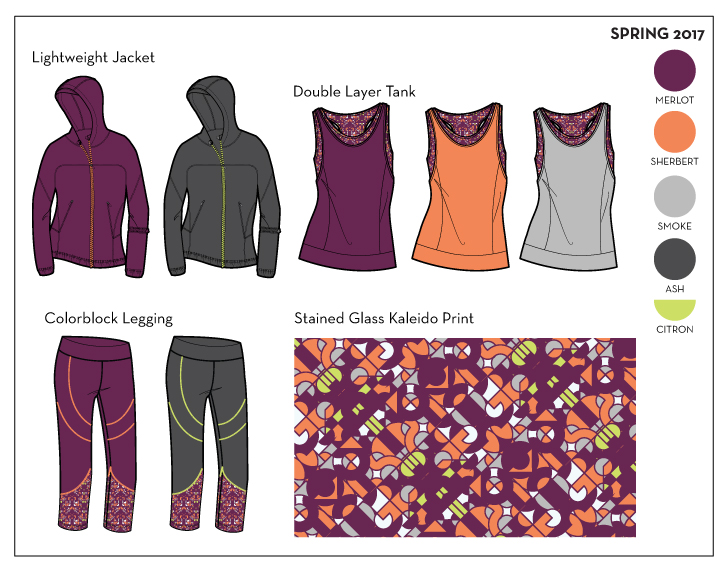
Layouts & Line Sheets

Once the collection is designed, it’s presented to the sales team and buyers in the form of a line sheet or presentation board. This is one of the most gratifying parts of the process*, when everything you've worked so hard on creating comes together to form a unified and cohesive collection.

*I just had to add an extra note here to mention the most gratifying part of the process - receiving finished garments from the factory! All of the work I design is produced overseas, so it's typically 6-8 months or more from the day I start designing to the day I actually see the garments in their completely finished states. Even after many years in the industry, getting those packages in the mail still makes me feel like a kid on Christmas morning. I'll never forget the very first time I saw a garment I had designed in real life - it was a zip up vest with a tiny vine pattern embroidered throughout. I had spent months seeing it only on a computer screen and paper, and holding the finished piece - fabric, trims and all - was the moment I realized I had actually made it as a fashion designer. Baste & Gather meets {Sew Heidi}: How Fashion Designers Use Illustrator for Line Sheets & Presentations
How Many Fashion Designers Don’t Use Illustrator (but many sewers do)

Since you're here on Baste + Gather, there’s a good chance you’re using AI to draft and grade your patterns. If you’ve taken Lauren’s Pattern Workshop then you are absolutely familiar with how to do this! While many sewers focus on using Illustrator for this, it’s not something you see as often in the commercial fashion design world. If designers are drafting and grading their own patterns, they’ll typically use industry software specifically for this, such as Gerber’s Accumark Pattern Design Software. However, it's also very common (especially after essential pattern blocks are created) that drafting and grading for each style is done at the factory level using a chart of POMs (Points of Measure) that the designer provides.

Where the Worlds of Fashion Design And Sewing Collide in Illustrator

Did the black and white fashion flat sketches above look familiar to you? You’ve probably noticed that most commercial patterns include black and white sketches very similar to these on the envelopes. If you are on the path to selling your patterns (or have already started), you’d most likely want to create flat sketches of your designs to show in addition to the photos. The process you would go through to create these flats would be same that we use in the fashion world, and you’ll want to get yourself up to speed on the Pen Tool (if you’ve fought with this tool like many designers have, that’s probably not what you wanted to hear - but I promise that once you master it, everything else will become so much easier!).

How Will You Use Illustrator?

You may not be drafting patterns to sell and instead your focus is on sewing personal projects. For many years, I sewed and sold my designs at boutiques throughout the US, but I never actually sold a sewing pattern. So instead of using AI for drafting and grading, I used it to mock up my designs before cutting and sewing. I found it tremendously helpful to visualize my design before I cut into the fabric only to later decide I didn't like the design (yikes!). Many designers sketch by hand, but since that was never my strength, I found it easier and quicker to design and make edits in Illustrator.

How will you incorporate some of these Illustrator features into your design and sewing process? Or if you’re already using the software in new ways, share some of the creative things you’re working on!

Thanks so much for the great post, Heidi!

In Adobe CC Tutorials, Pattern Workshop
Screen-Shot-2014-07-25-at-11.32.45-AM.png

Teaser Video from My Upcoming BurdaStyle Course

July 25, 2014

Good morning, friends! There's been a ton of interest in my BurdaStyle course, Digital Pattern Drafting with Adobe Illustrator, so this morning, I took some time to make a quick teaser video for you guys from one of the course lessons. Of course, this is a much abbreviated version, but you will see the type of thing you'll learn to do in the course through this short, little video: [vimeo width="649" height="419"]http://www.vimeo.com/101734168[/vimeo]

The video, in its entirety, is about half an hour long - and that includes lots of background information. Just imagine being able to draft a complete skirt block in 15 or 20 minutes! With the lessons in this course, you absolutely can!

Here's a full outline of what you'll learn in this course (changing slightly as I add content for better organization):

Session 1 - Adobe Illustrator Essentials

  • Menus
  • Preferences
  • Custom Workspaces
  • Artboards
  • layers
  • Actions
  • Types
  • Transform, align, and pathfinder
  • Pen Tool
  • Shape Tools
  • Rotate Tools
  • Artboards
  • Measuring curves
  • Strokes
  • Color/fill/symbols palettes

Session 2 - Preparing Measurements for Block Creation

  • Creating a Google Sheet
  • Fill in block measurements

Session 3 -Creating Blocks in Illustrator

  • Creating Fitted bodice Block: wovens
  • Create Flat Bodice Block: knitwear
  • Create Skirt Block: wovens
  • Create Trouser Block: wovens

Session 4 - Modifying Block to Create Unique Styles

  • Using pathfinder
  • Moving anchor points
  • Using pivot points ( digital slash and spread)

Session 5 - Adding and Subtracting Seam Allowances

  • Add/subtract seam allowance ( offset path method, simple shapes)
  • Add/subtract seam allowance ( stroke method)

Session 6 - Tiling for At Home Printing

  • Setting up a tiling template
  • Exporting as PDF

Session 7 - Digital Grading

  • Using a Google sheet to calculate X/Y anchor point movement
  • X/Y coordinate method
  • Blend tool method
  • Combo Method

Session 8 - Marking up Patterns for Ease of Use

  • Scale square
  • Grading lines
  • Seam allowance notations
  • Notches and other markers
  • Scale square
  • Center fold arrows
  • Grainlines
  • Piece number
  • Piece name
  • Piece cutting instructions

The course starts Monday, July 28 and is 8 weeks long. Enrollment closes on Friday, August 1. There are assignments at the end of each session, and you can access previous sessions' materials if needed throughout the course. You will have up to four weeks after the 8-week course period to access and refer back to the material. All lessons are delivered via Blackboard, so you can easily interact with me, the instructor, and all your fellow students.

You'll notice that this course DOES include grading and tiling, but it does NOT include anything about selling your patterns, drawing illustrations, creating your pattern instructions in InDesign, etc. This course is truly targeted to the sewist who wants to create her own library of pattern blocks that can be used again and again to quickly and accurately design her own, custom-fitted garments.

Through the course, you will actually develop four slopers that can be used to create endless designs of your own. All the instructions are based on the Winifred Aldrich book, Metric Pattern Cutting for Women's Wear. Pretty cool, eh??!!

So what are you waiting for?! Go sign up today!


In Adobe CC Tutorials, BurdaStyle
DSC0843.jpg

Pattern University Pre-Sale is ON...and Answers to Some Questions

January 28, 2014

The photo above is another one of those that has nothing to do with the post. But it makes me happy. And after my intense day yesterday, I need happy! :D

Well. Yesterday was a crazy whirlwind of craziness. Good craziness, confusing craziness, anxious craziness, scary craziness, sad craziness. ALL THE CRAZINESS. And yesterday rocked (mostly)! Thanks so much to those of you who already signed up for the first Pattern University course, and thanks to everyone who tweeted/facebooked/etc. the pre-sale. Oh yes, and thanks to those of you who asked questions about the course.

Speaking of questions, I want to address some of those. I wrote a short response in a Facebook group yesterday about how my course is different than the others currently available, but I wanted to elaborate a bit more here.

Let me first say that I have not taken the other courses out there. And honestly, I only know of one other designer who even offers a course. So, I can't really compare myself to the competition. But I can tell you more about my own material.

How does my course differ from the other courses?

As far as content is concerned, there are two areas that I think my course is different. First, my course includes more topics - and lots more about the non-technical things that designers often struggle with. For example, I include several lessons on marketing and affiliate programs. My background is in marketing, so I get a thrill out of helping people start and grow businesses. You could call my course "How to Create a Successful PDF Pattern Business" as opposed to "How to Digitize Patterns."

Another difference is the platform on which my course is built. Pattern University is completely self-contained and self-hosted using industry-standard courseware. My students' access to the courses will never go away, and can never be affected by another site's downtime or future changes. And since no one is charging me a commission fee to host my content, I am able to offer my students a competitive price.

Next, my course is designed to be interactive. Students can contact me by writing comments on their individual lessons or interacting with other students and alumni in the Pattern University facebook group (a closed group only for current/past students). Through the comments and public forum, we all learn and grow together. And it's FUN!

The final difference that's been mentioned to me is teaching style. I have tried and tried to create courses that are formal and scripted. It doesn't work for me! I make Justin Timberlake jokes. I mess up. I wear my hair in a huge ball on top of my head. My kids might even occasionally make an appearance. That's not to say my videos aren't high-quality or professional - they absolutely are. But the people who have seen them so far (and who know me in person) say they're fun and engaging while still being super educational. I like to imagine I'm on a coffee/soda/water/hard liquor/what-have-you date with my students while I'm making videos.

Shouldn't the course cost more than $149 if it's so comprehensive and high-quality?

Yes! I'm not going to argue with that. This course is worth much, much more than $149 (or $119 if you are taking advantage of the pre-sale). Most people who have seen the table of contents and viewed any of my contents have recommended a price between $300-500.

But here's the thing. I totally think a top-of-the-line Bernina sewing machine is worth $10K+. Oh yes, I do! And I would LURVE to buy one. But you know what? It's just not in my budget right now. I can't pay that for a sewing machine now, and I don't know if I ever will.

When I first started publishing my free video tutorials, I told you they were free because I got compensation out of comments and satisfied blog readers. The same still holds true for this course - I want it to be accessible but also to benefit my family (and help me pay for my startup costs) in some way because of all the hours and hours of outlining, prepping, videoing, re-videoing and editing that I'm doing.

I had originally decided to offer my course for $249, and honestly, I think that would still be a deal! But, reality hit...and I realized that many of my target market are stay-at-home-moms with limited funds and other priorities. I lowered my price to make the course obtainable but also beneficial to me.

Do my students need drafting or technical experience to take the course?

No! I mean, those things will certainly help. But I've designed my course so it works for everyone - from the absolute beginner to the experienced designer who wants to add a few tricks to her stash. If you've sewn a few garments, read some patterns and had a few good ideas, you've met the prerequisite for this course. And I'm reachable via email or the student facebook group to help with any problems and answer questions.

Who am I to tell you how to run a pattern business if I don't have one of my own?

Ahhhh, you got me there! I DON'T have my own line of sewing patterns. And there's a good reason excuse for that. I am a perfectionist. So much of a perfectionist that I often stall in the final stages of a project. I have designed so many patterns over the years and never released them. I do have knitting patterns currently for sale, but I also have some that have been tested and still not released. And I have done the technical stuff for many other designers (or given one-on-one tutoring), but there's just something about putting my own ideas out there that scares the bejesus out of me.

I also get sucked into my own creative brain sometimes. But what if I changed this or curved that more or lengthened this or offered this other option?! (You designers know what I'm talking about!) Designing patterns is really, really hard, and I have an infinite amount of respect for those of you who do it so well! It's not rocket science in the technical sense (or else I wouldn't be teaching this course! Ha!), but it's an art. And I haven't refined my art to a point that I'm ready to share it with the world just yet.

I am hoping (fingers and toes crossed) and diligently working to change that in 2014. So stay tuned for me to release some awesome new patterns later this year.

I really hope this answers some of your questions. And if you have any more, please mention them in the comments below. I will do my best to answer every single one. You can also contact me in private via my contact form.

Oh, there are still a few spots left in the pre-sale! So if you're still on-the-fence about the course, now is the time to sign up for just $119. I have given myself a deadline of finishing the course by March 15, but I'm really, REALLY hoping it will be done before then. Very exciting!

And again, thanks to everyone for their encouraging comments!

In Adobe CC Tutorials, Pattern Workshop Tags pattern university, thoughts
Older Posts →

WELCOME

My name is Lauren Dahl, and I take lots of awkward selfies around the Portland, Oregon metro area. Learn more about me here, or sew along using the social media links below.

Follow Along on Instagram

New #truebias #hudsonpants for Ezzie! #sewing #isew #sewcialists
Kids' handmade tees game is strong tonight...they're gonna have quite the collection come fall! #sewing #brindilleandtwig #isew #sewcialists
#libertyoflondon brushed cotton for a special little girl 😍😍😍 from @josephinesdrygoods in #pdx 
#sewing #isew #sewcialists #fabricporn
Had some fun with my new Bernina tonight! Finally!! #berninalove #sewing #isew #sewcialists #imakemyclothes #imademyclothes
Do these drawers scare the hell out of anyone else? This one is sitting on the ground in front of the chest at @joann_stores. They seem to fall out and break constantly.

Powered by Squarespace